Host an MCP server from a Python script
An agent that can only talk is a chatbot. An agent that can list an inbox and hash a file is a coworker. MCP is the USB cable between those two — and the whole server can be one Python file.
I spend my days on landing zones, HL7, and “did this file actually deliver.” The useful
question for an assistant is not “explain SFTP.” It is “what is sitting in
data/inbox/ right now, and have we already seen this SHA-256?” That is a
tool, not a paragraph in a system prompt.
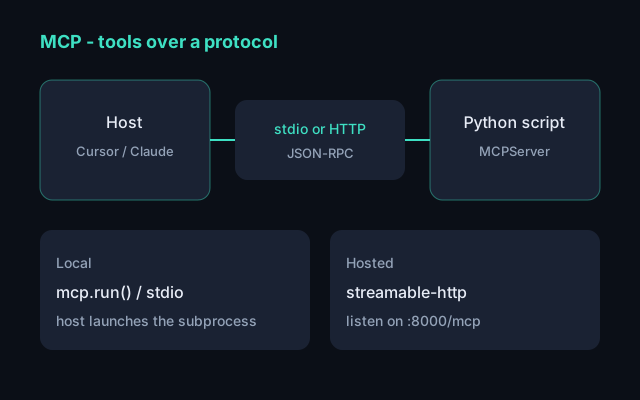
Model Context Protocol is how you expose that tool to Cursor, Claude, or anything else that speaks MCP. The host lists your functions, the model picks one, you run real Python, you return a result. Same contract whether the process is local or sitting on a port.
What an MCP server actually is
Three things, not a framework:
- Tools — functions the model can call (with the user in the loop).
- Resources — readable blobs, like a file or an API snapshot.
- Prompts — reusable templates. Optional.
The interesting bit is the transport: how bytes move. Local hosts launch your
script as a subprocess and speak JSON-RPC over stdin/stdout. Anything you deploy
listens on HTTP instead. The tools do not change. Only mcp.run(...) does.
| Transport | When |
|---|---|
stdio |
Local. Cursor or Claude Desktop starts the script. Default. |
streamable-http |
Hosted. A real HTTP server on a port. This is what you deploy. |
sse |
Legacy HTTP. Do not build new servers on it. |
One script, two tools
Official Python SDK v2: MCPServer, type hints as the schema, docstring as
the tool description. This lab mirrors the
file transfer pipeline without dragging in
Terraform — list an inbox, hash a file the way the audit log would.
# server.py
from __future__ import annotations

import hashlib
import logging
from pathlib import Path

from mcp.server import MCPServer

logging.basicConfig(level=logging.INFO)  # stderr — never print() on stdio
logger = logging.getLogger("inbox-mcp")

mcp = MCPServer("inbox")


@mcp.tool()
def inbox_status(root: str = "data/inbox") -> str:
    """List files in a landing-zone directory with sizes in bytes."""
    path = Path(root)
    if not path.is_dir():
        return f"Not a directory: {path}"
    rows = []
    for item in sorted(path.iterdir()):
        if item.is_file():
            rows.append(f"{item.name}\t{item.stat().st_size}")
    logger.info("listed %s files in %s", len(rows), path)
    return "\n".join(rows) or "(empty)"


@mcp.tool()
def file_sha256(path: str) -> str:
    """SHA-256 of a file, the same key a pipeline would use to skip duplicates."""
    target = Path(path)
    if not target.is_file():
        return f"Not a file: {target}"
    digest = hashlib.sha256(target.read_bytes()).hexdigest()
    return f"{digest}  {target.name}"


if __name__ == "__main__":
    mcp.run()  # stdio
Keep run() under if __name__ == "__main__". Hosts import the
file first; if you call run() at import time you hang the inspector.
Install and smoke-test with the official inspector:
uv add "mcp[cli]"
uv run mcp dev server.py
Call inbox_status with a real folder. If that works, the protocol is fine
and you can wire a host.
Host it locally (stdio)
This is the “Cursor launches my script” path. No port, no Docker. The host is the
parent process; your server must not write to stdout — print() corrupts
JSON-RPC. Logging to stderr is fine.
In Cursor, add the server to MCP settings (or .cursor/mcp.json):
{
  "mcpServers": {
    "inbox": {
      "command": "uv",
      "args": ["run", "server.py"],
      "cwd": "/absolute/path/to/the/project"
    }
  }
}
Same idea for Claude Desktop in
~/Library/Application Support/Claude/claude_desktop_config.json. Restart
the host. You should see inbox_status and file_sha256 as
tools.
Host it on a port (Streamable HTTP)
Same file. The tools do not move. You change how bytes arrive — this is the deploy path, including anything you put behind a reverse proxy later.
if __name__ == "__main__":
    import os

    transport = os.getenv("MCP_TRANSPORT", "stdio")
    if transport == "http":
        mcp.run(
            transport="streamable-http",
            host="127.0.0.1",
            port=8000,
            stateless_http=True,
            json_response=True,
        )
    else:
        mcp.run()
Run it:
MCP_TRANSPORT=http uv run server.py
# listens on http://127.0.0.1:8000/mcp
Or without editing the file:
uv run mcp run server.py --transport streamable-httpPoint a host at the URL instead of a command:
{
  "mcpServers": {
    "inbox": {
      "url": "http://127.0.0.1:8000/mcp"
    }
  }
}
Defaults: host 127.0.0.1, port 8000, path /mcp.
Bind to localhost until you put TLS and auth in front. Streamable HTTP is the current
HTTP transport; SSE still exists for old clients.
What I would not skip
- Do not
print()on a stdio server. Uselogging. - Put
cwd(or an absoluterootargument) in the config so the inbox path is not a surprise. - Treat tools like an API: stable names, boring return strings, no stack traces to the model.
- Local first. HTTP second. Public internet never without auth.
This is the same shape as the rest of the labs on this site: a small Python surface
that fails in a way you can explain. Pair it with the
pipeline if you want the worker that actually
moves files, or the HL7 toolkit if the next tool you
expose should be validate_hl7.