GoAnywhere MFT is a landing zone with a job log
A cron job that copies files is not managed file transfer. Managed means: a named partner, a folder they can write, a project that wakes up, a sink that actually received the bytes, and a log you can read at 2 a.m. That is the product I live in.
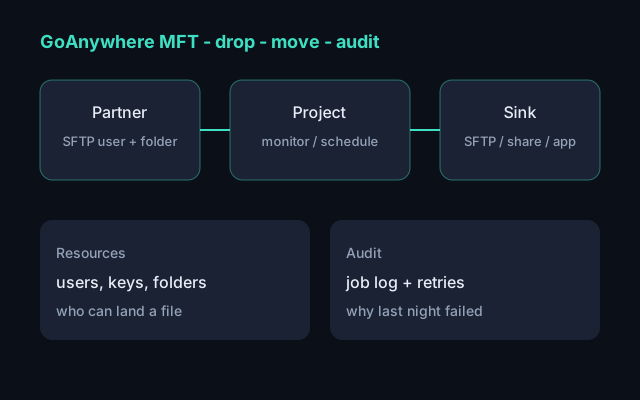
GoAnywhere MFT (Fortra) is the enterprise box around that loop. I used it after years of tickets on healthcare file traffic — HL7, payments, credentials, overnight jobs that did not run. This is not a vendor tour. It is how the object model maps onto the work. No PHI, no client names, no production paths.
The Python file-transfer lab on this site is the same shape without the product: inbox, validate, deliver, audit. GoAnywhere is what that looks like when partners, keys, and compliance are real.
Four objects, not a magic FTP
Most “the file did not arrive” tickets collapse onto one of these:
| Object | What it actually is |
|---|---|
| Resource | Who can connect, and where they land — SFTP users, keys, folders, downstream hosts. |
| Project | The workflow: pick up, optionally encrypt or translate, put somewhere else. |
| Trigger | A schedule, a file monitor, or an API call that starts the project. |
| Audit | Job history: started, failed, retried, which resource, which file name. |
If you skip the names and only stare at a share, you will “fix” the wrong layer. A partner with a dead key is not a broken project. A project that still points at last year’s folder is not a network outage.
What a drop looks like
- A trading partner authenticates to an SFTP (or FTPS / HTTPS) resource you issued.
- They write into a folder that resource is allowed to see — the landing zone.
- A file monitor or a scheduler starts a project.
- The project moves or copies the file to an internal share, another SFTP, object storage, or an app.
- The job log records success or a stable failure: auth, path, timeout, empty payload.
Healthcare adds HL7 into that path. GoAnywhere will move the message. It will not tell you the control ID is missing. That check belongs at the edge — the HL7 toolkit post is the public version of that gate. MFT that “succeeded” with a garbage ADT is still a ticket, just later, in billing.
Where it breaks (and what I open first)
| Symptom | First place to look |
|---|---|
| Partner says they uploaded; we have nothing | Resource auth, chroot / virtual folder, and whether they wrote the path the monitor watches. |
| File sits in the inbox | Monitor disabled, schedule in the wrong timezone, project still “held.” |
| Job failed after pickup | Downstream resource: expired key, host key change, disk full, TLS mismatch. |
| Job succeeded, downstream is empty | Wrong sink folder, overwrite vs rename, or they dropped a zero-byte file. |
| It worked yesterday | Password rotation, IP allow list, or a project promoted without its resource. |
The audit log is the product. If you cannot answer “which job, which resource, which filename, which error,” you are guessing. I would rather have a failed job with a code than a silent copy that nobody can reconstruct.
Resources are the API
Treat connections like code, not tribal knowledge. A partner gets a dedicated user
and a folder tree. A downstream system gets its own resource. Projects
select resources; they should not embed passwords. When someone rotates a
key, you change the resource once. Every project that pointed at it picks up the
change. That is the whole point of a managed platform versus a pile of
lftp scripts in cron.
Same idea as Terraform in the lab: landing zones are declared. GoAnywhere’s declaration just lives in the admin UI (and, if you are disciplined, in export / promotion between test and prod).
What I would not do
- One SFTP user shared across ten partners. When it breaks, you cannot tell who.
- Monitors on a folder that also gets human uploads. You will process drafts.
- A project that “fixes” bad HL7 by rewriting PID. That is an interface engine’s job, and it hides the sender’s bug.
- Success email with no filename. The next ticket will be “which file?”
I first learned this shape on MOVEit tasks, then on GoAnywhere after an overnight process died and we had to move work with XML and a new platform. The brand on the box changed. The loop did not: land, decide, deliver, write it down.
If you want the interviewable, no-vendor version, start with the pipeline post. If you want the protocol that sits inside many of those files, start with HL7.
GoAnywhere MFT File transfer pipeline post HL7 toolkit post Back to blog